"Work Well" Apps
Apps that go well together with ReportBurster — FlowKraft's own apps, curated third-party tools, and ready-to-use Northwind starter packs for every major database engine.
Table of Contents
ReportBurster bundles a curated set of applications and sample databases — apps that go well together with ReportBurster. You manage them all from the Apps Manager screen — start, stop, and launch each one with a single click.
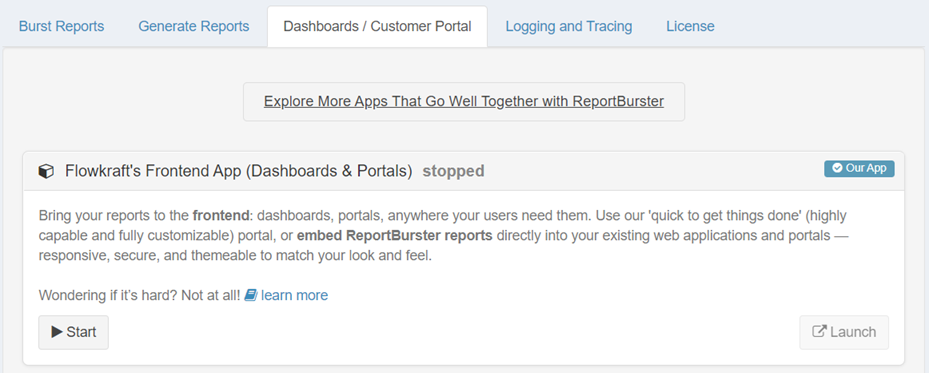
In the ReportBurster UI, you can find all available apps by clicking "Explore More Apps That Go Well Together with ReportBurster" from the Dashboards / Customer Portal tab:
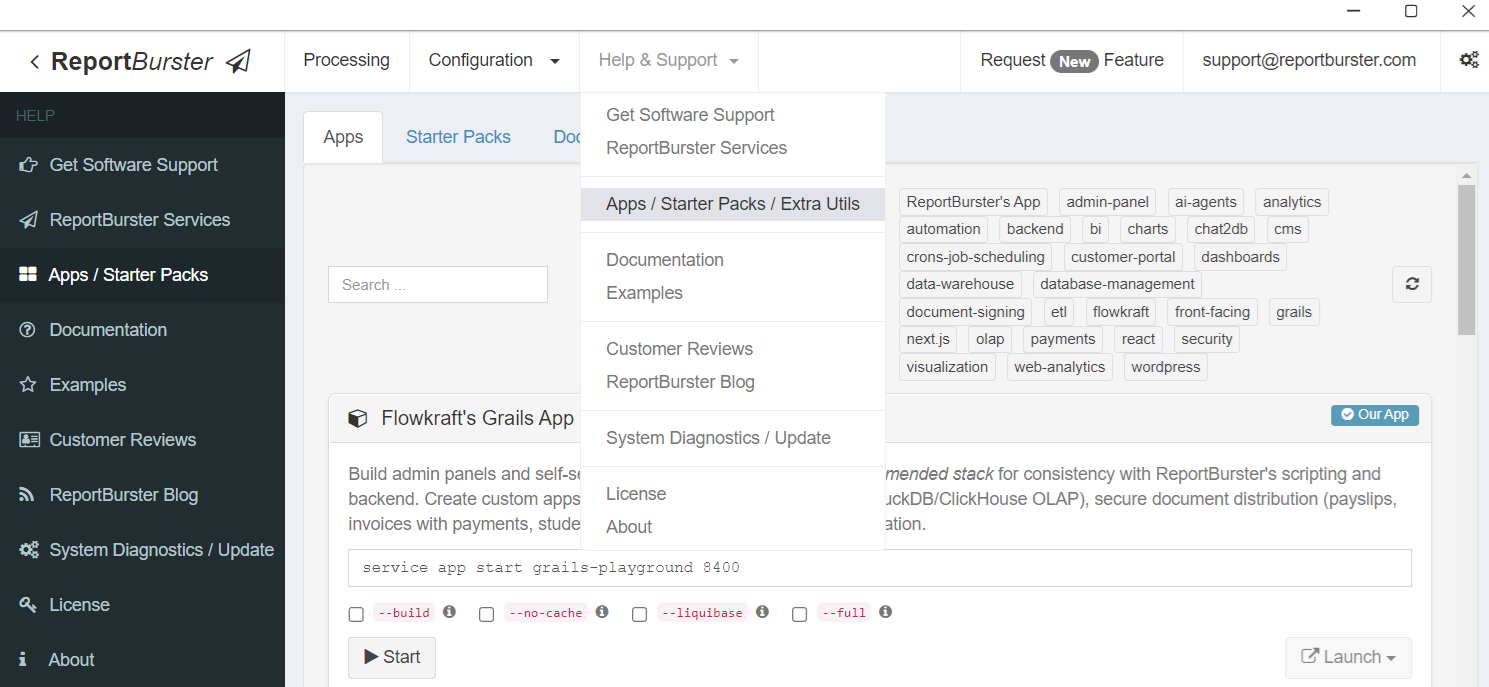
You can also reach the same screen from the top menu via Help & Support → Apps / Starter Packs:
Prerequisites
Docker Desktop (Windows/macOS) or Docker Engine (Linux) must be installed and running before you can use any of the apps or starter packs listed below. ReportBurster detects Docker automatically and displays a warning if it is not available.
Apps That Go Well Together with ReportBurster
ReportBurster ships with two kinds of apps: apps built and maintained by FlowKraft (the company behind ReportBurster), marked as Our App in the UI, and third-party open-source tools that complement your reporting workflows, marked as 3rd Party.
Grails App — Full-Stack Portals & Dashboards
Build admin panels, self-service portals, and real-time analytics dashboards. This is FlowKraft's recommended stack — it shares the same Groovy language used by ReportBurster's scripting and backend, giving you one language across the entire stack. Supports OLAP data warehouses, secure document distribution (payslips, invoices, statements), and interactive data visualization.
Backend App — Automation & Job Scheduling
A headless backend service for scheduling report generation jobs, automating document delivery, building ETL and data warehouse pipelines, and managing cron-based batch processing. No UI — this is an API-only service that powers your automated workflows behind the scenes.
Next.js App — Alternative Full-Stack Option
The same portal and dashboard capabilities as the Grails app, but built with the modern React/TypeScript ecosystem. Choose this stack if your team prefers Next.js, Tailwind CSS, and component-based development.
WebPortal — WordPress CMS
The fastest way to deploy a self-service portal — whether for employees (payslips), customers (invoices), partners, or students. Built on WordPress with a fully provisioned theme, role-based access control, and demo accounts ready to explore.
AI Hub — The FlowKraft AI Crew
Your team of AI experts — Athena, Hephaestus, Hermes, Pythia, and Apollo — accessible through Chat2DB for data exploration and visualization, and through Element Web for team-style conversations. See AI Crew for the full overview.
The following are popular open-source tools that go well together with ReportBurster. Each one is pre-configured and ready to use.
CloudBeaver — Database Manager
A professional web-based database management tool. Use it to browse your database schemas, inspect table structures, and run ad-hoc queries — a natural companion when designing reports or configuring database connections in ReportBurster.
cloudbeaver.io
Rundeck — Automation & Job Scheduling
Runbook automation with a web console, command-line tools, and a web API. Use it to schedule and orchestrate ReportBurster jobs, standardize operational tasks, and deploy automation across your organization.
rundeck.com
Matomo — Web Analytics
A privacy-friendly alternative to Google Analytics. Track usage and engagement on your document portals — see which documents are accessed most, monitor user activity, and generate analytics reports, all without sending data to third-party clouds.
matomo.org
Docuseal — Document Signing
A self-hosted document signing platform with secure workflows and audit trails. Add digital signature capabilities to your report distribution workflows — let recipients sign invoices, contracts, or compliance documents directly.
docuseal.com
Metabase — Business Intelligence & Visualization
An open-source BI and analytics platform. Connect it to your databases to build ad-hoc dashboards, run exploratory queries, and create shareable visualizations — complements ReportBurster's built-in BI web components with a full standalone analytics environment.
metabase.com
Starter Packs — Sample Databases
Each starter pack launches a Northwind sample database — a realistic dataset with customers, orders, products, and employees — preloaded into a different database engine. Use them to quickly learn how ReportBurster connects to, queries, and generates reports from each supported vendor.
All starter packs are managed from the Starter Packs tab in ReportBurster — start and stop each database with one click.
Northwind (Oracle)
Enterprise-grade relational database. The Oracle starter pack runs a fully initialized Oracle instance with the Northwind schema preloaded.
Northwind (SQL Server)
Microsoft SQL Server — widely used in enterprise environments. Preloaded with the Northwind sample database ready for querying and report generation.
Northwind (IBM Db2)
IBM Db2 for mainframe and enterprise workloads. The Northwind schema is preloaded and ready for use with ReportBurster's database connections.
Northwind (PostgreSQL)
The most popular open-source relational database. A lightweight and fast option for developing and testing reports locally.
Northwind (MySQL)
The world's most popular open-source database. Preloaded with the Northwind sample data for quick experimentation.
Northwind (MariaDB)
A community-developed fork of MySQL with enhanced performance and additional features. Fully compatible with MySQL-based workflows.
Northwind (ClickHouse)
A column-oriented OLAP database designed for real-time analytics. Use this starter pack to explore how ReportBurster works with analytical workloads, pivot tables, and large-scale aggregations.
Northwind (Supabase)
Supabase is more than a database — it is a complete development platform built on PostgreSQL. In addition to the Northwind sample data, it includes built-in authentication, auto-generated REST and GraphQL APIs, realtime subscriptions, file storage, and vector embeddings. Learn more at supabase.com.