Data Warehouse & OLAP
Leverage data warehouse and OLAP capabilities for advanced multidimensional analysis and reporting.
Table of Contents
- Three-Tier OLAP Approach
- DuckDB — Embedded Analytical Engine
- ClickHouse — Enterprise OLAP Server
- Star Schema (Sample Data Warehouse)
- OLTP to OLAP Sync (CDC Replication)
- ETL with dbt
- AI-Powered Data Warehouse Design
ReportBurster delivers serious data warehousing capabilities by standing on the shoulders of two giants: DuckDB and ClickHouse. Together, they cover the full spectrum — from quick ad-hoc analysis on your laptop to enterprise-scale warehouses handling billions of rows.
The best part? You use the same <rb-pivot-table> component regardless of which engine powers it. Start small, scale up — no code changes required.
Three-Tier OLAP Approach
ReportBurster supports three analytical engines, each suited to a different data scale:
| Tier | Engine | Data Scale | Best For |
|---|---|---|---|
| Browser | In-browser | Up to ~100K rows | Quick ad-hoc analysis, no server needed |
| DuckDB | Server-side embedded | ~100K – 100M rows | Fast analytical queries, zero administration |
| ClickHouse | Dedicated OLAP server | 100M – 10B+ rows | Enterprise-scale data warehouse |
How it works in practice:
- The
<rb-pivot-table>web component works identically across all three engines — the same drag-and-drop pivot table, the same aggregations, the same user experience - The engine is auto-detected from your database connection type — no manual configuration needed
- Start with Browser for prototyping, graduate to DuckDB when your data grows, and scale to ClickHouse when you need a full data warehouse. Your reports, dashboards, and embed code stay the same
Tip: The Pivot Tables documentation covers the
<rb-pivot-table>component in detail — attributes, DSL configuration, and examples.
DuckDB — Embedded Analytical Engine
DuckDB is an in-process analytical database designed for fast OLAP queries. Think of it as "SQLite for analytics" — it runs inside ReportBurster's Java backend process with zero external dependencies and zero administration.
Why DuckDB is a great fit for ReportBurster:
- No separate server. DuckDB runs embedded inside the ReportBurster backend — nothing extra to install, configure, or maintain
- Columnar storage. Analytical queries (GROUP BY, aggregations, window functions) execute dramatically faster than on row-oriented databases
- Millions of rows, sub-second response. Handles datasets far beyond what browsers can manage, while staying fast enough for interactive pivot tables
- Full SQL support. Standard SQL with advanced analytical functions — if you know SQL, you know DuckDB
- Parquet, CSV, JSON. Query files directly without importing — useful for ad-hoc exploration of exported data
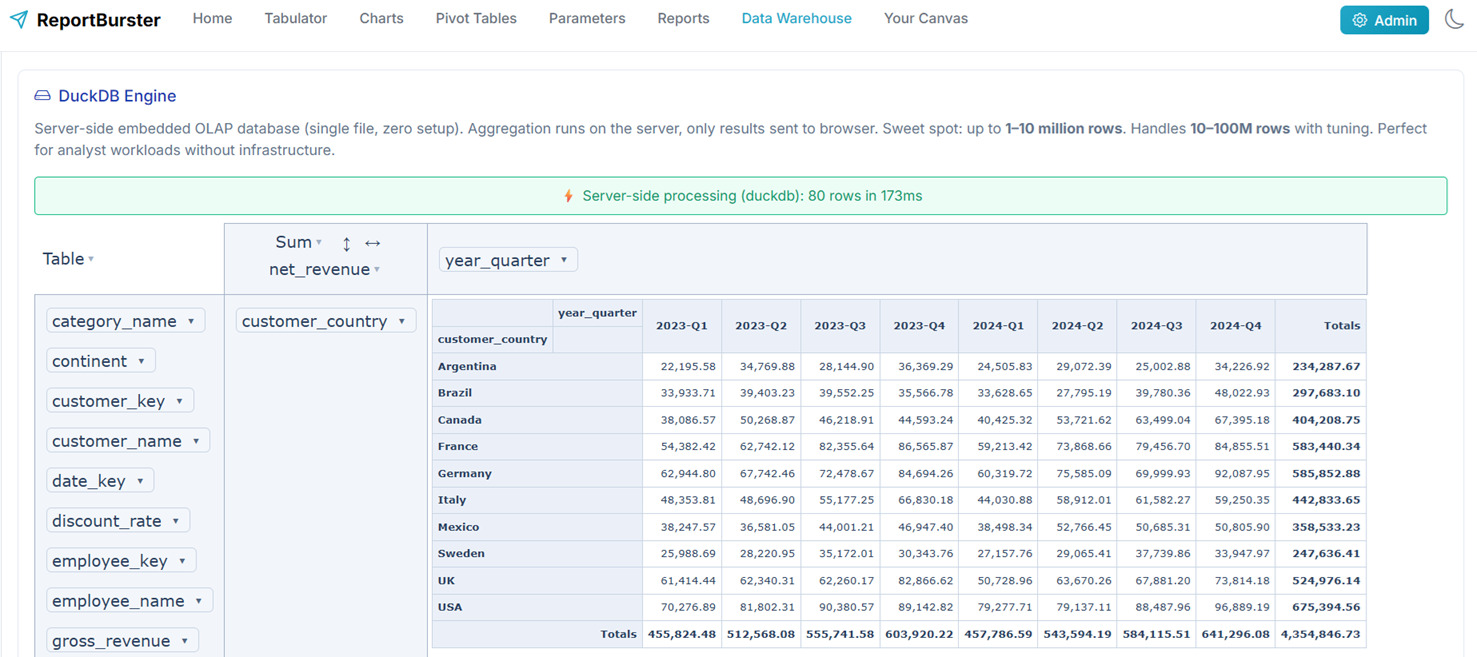
DuckDB is the sweet spot for most ReportBurster deployments. It delivers warehouse-grade analytical performance without any infrastructure overhead.
ClickHouse — Enterprise OLAP Server
ClickHouse is a column-oriented OLAP database management system built for real-time analytical queries at massive scale. It processes billions of rows per second and is used by companies like Cloudflare, Uber, and eBay for their analytics infrastructure.
When to choose ClickHouse over DuckDB: When your analytical dataset exceeds ~100 million rows, when you need real-time CDC replication from production databases, or when multiple users and applications need to query the same warehouse concurrently.

Why ClickHouse is a great fit for ReportBurster:
- Billions of rows. When your data outgrows DuckDB, ClickHouse handles enterprise-scale datasets with ease
- Real-time ingestion. Stream data from your OLTP databases via CDC and query it in near real-time
- Columnar compression. Typical 10–40x compression ratios mean your 1TB dataset uses 25–100GB on disk
- Full SQL. Standard SQL with ClickHouse-specific extensions for time series, approximations, and materialized views
- Bundled with ReportBurster. Ships pre-configured in Docker Compose — one command to start
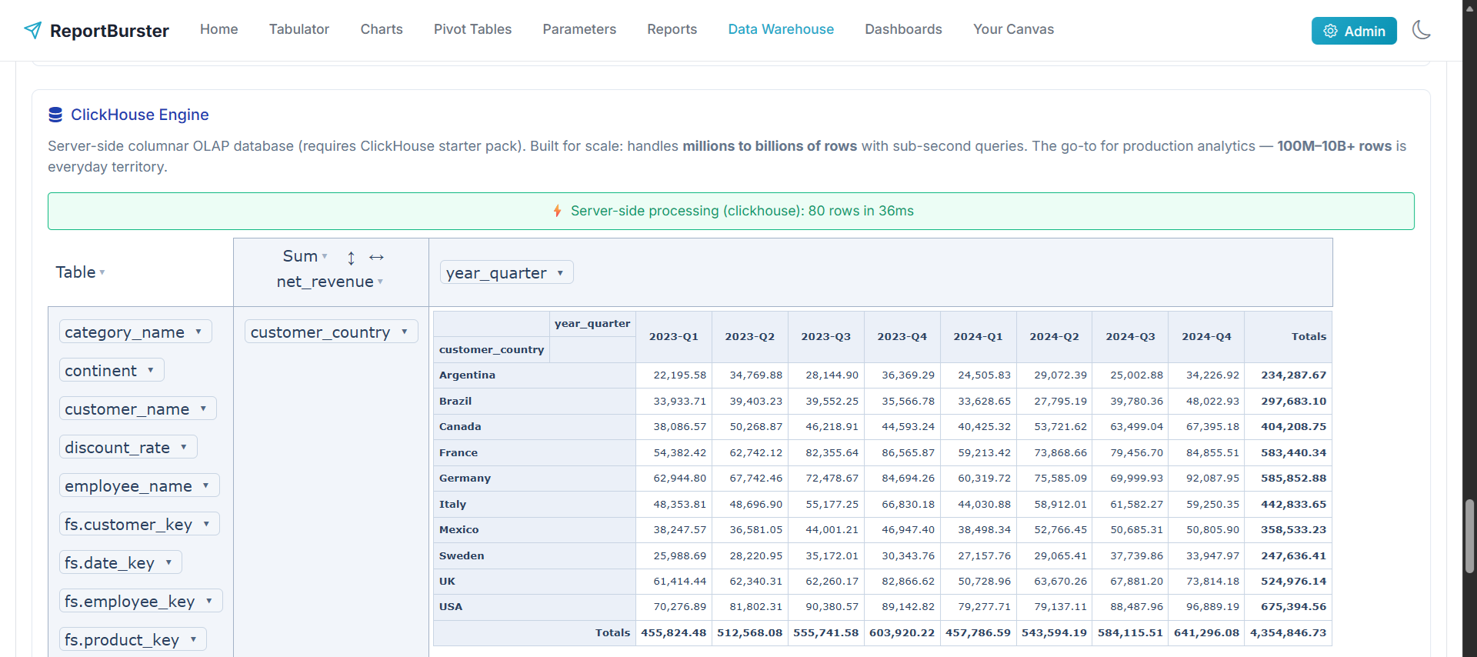
Notice between the two DuckDB and ClickHouse screenshots that, for the same sample data and same pivot configuration, the <rb-pivot-table> component returns (as expected) exactly the same calculations. In fact, <rb-pivot-table> is capable of transparently switching between Browser, DuckDB, and ClickHouse engines without any code change — allowing you to start with the Browser engine (why not, if it works!) and then, as the load grows, progressively switch to DuckDB and finally to ClickHouse (lucky you if you have billions of data rows to analyze!).
Star Schema (Sample Data Warehouse)
ReportBurster ships with a complete sample data warehouse based on the Northwind dataset — a classic star schema ready for analysis:
Fact Table:
fact_sales— ~8,000 transactions with quantity, unit price, discount, and calculated revenue
Dimension Tables:
dim_customer— 30 customers across 21 countriesdim_product— 16 products in 4 categoriesdim_time— 672 month-level records (1996–2051)dim_employee— 3 sales employees
Analytical Views:
vw_sales_detail— denormalized view joining fact + all dimensions (ready for pivot tables)vw_monthly_sales— time-series aggregation by month, customer, and product
This is a working, queryable data warehouse — not a mockup. Use it to learn, prototype dashboards, and explore how star schemas work. When you're ready, replace the Northwind models with your own business data.
Tip: The sample warehouse is pre-loaded in both DuckDB and ClickHouse. Connect a pivot table to either engine and start exploring immediately.
OLTP to OLAP Sync (CDC Replication)
The first step in building a data warehouse is getting your operational data into it. ReportBurster supports real-time CDC (Change Data Capture) replication from your OLTP databases to ClickHouse using the Altinity Sink Connector.
Supported sources:
- MySQL and PostgreSQL — native, out of the box
- SQL Server, Oracle, Db2, MongoDB — via Debezium connectors
How it works:
- Prepare your ClickHouse target — use ReportBurster's bundled ClickHouse or connect to your own
- Enable CDC on your source — turn on binlog (MySQL) or WAL (PostgreSQL)
- Configure the sink connector — edit
docker-compose.ymlwith your source/target connection details - Start replication —
docker compose up -d clickhouse-sink-connector - Verify — insert a row in your source database, query it in ClickHouse
- Use in ReportBurster — connect a pivot table or dashboard to your ClickHouse warehouse
Changes in your production database appear in ClickHouse within seconds — no batch jobs, no scheduled exports, no stale data.
Full setup guide: The detailed step-by-step instructions (with MySQL and PostgreSQL examples, Docker Compose configuration, and troubleshooting) are included in ReportBurster at
db/CONFIGURE_OLTP_2_OLAP_DATA_WAREHOUSE_SYNC.md.
ETL with dbt
CDC replication gets your raw OLTP tables into ClickHouse — but raw tables aren't a data warehouse. You need to transform them into a proper star schema with dimension tables, fact tables, and analytical views. That's what dbt (data build tool) does.
ReportBurster bundles a complete dbt project using dbt Core with the dbt-clickhouse adapter:
What the transform produces:
- 5 staging views (thin rename/cast layer over raw OLTP tables)
- 4 dimension tables (
dim_customer,dim_product,dim_employee,dim_time) - 1 fact table (
fact_sales) - 2 analytical views (
vw_sales_detail,vw_monthly_sales)
Running the transform:
cd db
docker compose run --build dbt-transform runOne command. Docker handles the environment. dbt handles the SQL.
Scheduling in production:
- Simple: Cron job —
30 * * * * cd /path/to/db && docker compose run dbt-transform run - Advanced: Apache Airflow, Dagster (native dbt integration), or Prefect
Start with cron. Graduate to an orchestrator when you need retries, alerting, or multi-step pipeline management.
Customization: The bundled Northwind models in db/dbt/models/ are templates. Replace the staging and mart models with your own business schema, update the source definitions, and rebuild.
Full ETL guide: The detailed step-by-step instructions (including verification queries, test commands, connection settings, and customization) are included in ReportBurster at
db/CONFIGURE_ETL.md.
AI-Powered Data Warehouse Design
Don't know where to start with your data warehouse? Athena — ReportBurster's AI advisor — can guide you through the entire process, from schema design to working dashboards.
Athena has hands-on experience with every part of the OLAP stack:
- Pivot table reports over OLAP databases — Athena walks you through connecting to DuckDB or ClickHouse, configuring the pivot table DSL, choosing dimensions and measures, and testing the result
- CDC replication setup — Athena helps you configure the Altinity Sink Connector for your specific source database (MySQL, PostgreSQL, or others)
- dbt transforms — Athena guides you through designing your star schema, writing dbt models, and running the transform pipeline
Each of these is demonstrated in a real AI conversation — not a script, not a mockup. You can see exactly how Athena reasons through each step.