Large-Scale Report Generation
Generate thousands or millions of reports and see the results on your own hardware. ReportBurster includes a built-in data seeding tool so you can quickly load realistic volumes and run your own performance test — no guesswork, no trust-us benchmarks.
Table of Contents
Can It Handle My Volume?
ReportBurster was built from the ground up to generate and distribute large numbers of reports. If you are evaluating it for payslips, invoices, statements, letters, or any other document type at scale, you are probably asking yourself: "Can it actually handle my volume?"
That is the right question. And the honest answer is: it depends. It depends on your hardware, your database, your report complexity, your output format, your server load. Every environment is different, and no vendor benchmark can tell you what will happen on your machine with your data.
So instead of publishing numbers that may not reflect your reality, we built something better: a way for you to answer that question yourself, in minutes.
ReportBurster includes a built-in data seeding tool inside its Starter Packs. You pick a database, seed it with the volume of data you expect in production — 1,000 records, 100,000, or a million — configure your reports, click Generate, and see exactly what you get. On your hardware. With your setup. No guesswork.
Try It Yourself — In Minutes
Step 1: Start a Database Starter Pack
Go to Help & Support → Apps / Starter Packs / Extra Utils and pick the database vendor you want to test with. Click Start — a Docker container with a sample database spins up automatically.
Note: You need Docker installed and running on your machine. Each starter pack launches a fully configured database container with realistic sample data preloaded.
Step 2: Seed Your Data Volume
Once the starter pack is running, the seed controls appear below the Start/Stop button:
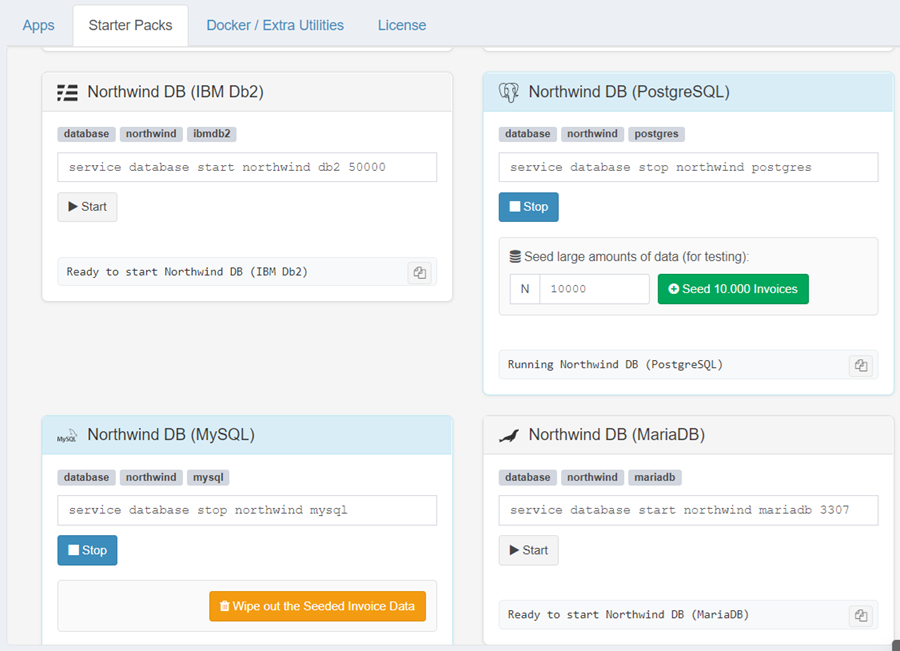
- Enter the number of records you want (e.g., 1,000 or 10,000 or 100,000 or 1,000,000).
- Click Seed.
- Wait for the seeding to complete — realistic data (customers, products, invoice headers, and line items) is generated into dedicated tables.
The seeding tool generates invoices because invoices are sufficiently complex — each one joins customer details, product information, and multiple line items. This is representative of any real-world business report, not a trivial single-table query. The performance you see with these invoices on your hardware, at your data volume, will be meaningful for any report type you generate in production — payslips, statements, work orders, or anything else.
The seeded data sits alongside the original sample data and does not interfere with it.
Step 3: Generate Your Reports
Now you have a large dataset to work with. Configure a report the same way you would for your real use case:
- Create a report configuration (or use an existing one).
- Set your data source to query the seeded data — use SQL or a Groovy script.
- Choose your output format: PDF, Excel, HTML, Word, JasperReports, or any other supported type.
- Click Generate and watch ReportBurster work through the volume.
This is the moment of truth — not a number on a marketing page, but a real run on your real machine.
Step 4: See Your Results
Check the output folder for the generated documents. You will know:
- How long it took — from start to finish.
- How many documents per minute — your actual throughput.
- How your machine handled it — CPU, memory, disk usage.
This is your answer. Not ours — yours.
Step 5: Wipe and Try Again
Click Wipe out the Seeded Data to remove all previously seeded invoice data.
Then seed a different volume and test again. Try 10x more. Try a different database engine. Try a different output format. Compare.
Supported Databases
The data seeding tool works with all database starter packs:
- Oracle
- SQL Server
- PostgreSQL
- MySQL
- MariaDB
- IBM Db2
- Supabase (PostgreSQL BaaS)
All seven vendors support the same workflow. The seeding engine handles vendor-specific differences internally — you just enter a number and click Seed.
Tips for Large Volumes
- Start small. Seed 1,000 records first to verify everything works, then scale up to 10K, 100K, or beyond.
- Monitor disk space. Generating a large number of documents takes disk space. Make sure your output drive has room.
- Windows Explorer and large folders. Explorer slows down when a single folder contains more than ~100,000 files. The generation itself is not affected — only the file browser struggles. Use the command line or archive tools to browse very large output folders.
- Try different databases. The same data volume can perform differently across database engines. Seed the same amount on multiple vendors and compare.
- Wipe before re-seeding. Always wipe the previous seeded data before seeding again to keep your test clean.
"I have the data, but where is the invoice template?"
You may have noticed that the starter packs seed invoice data but do not include a ready-made report template. This is deliberate:
- We do not know which output format you need. ReportBurster supports HTML, PDF, Excel, XML, and more — and for PDF alone it offers three different engines (HTML2PDF, Apache FOP, and JasperReports).
- Your template should match your documents, not a generic sample.
The good news: generating a template is trivial with the AI tools built into ReportBurster. Use either "Hey AI, Help Me with This Template" or Athena — ReportBurster AI Guru to:
- Ask AI to create a standard invoice template that matches the seeded data model, in the exact output format you want.
- Or go further — describe your own real-world document layout and let AI generate a template that mirrors your invoices, payslips, or statements.
- You can even pre-fill the template with actual data or leave it parameterized — either way, the report generation flow will fetch all N rows from the database, loop through each record, apply your template, and produce the output documents along with performance statistics.
This way you test with your expected data volume and your actual document layout — giving you the most accurate performance results possible.