Report Parameters Component
Embed parameter forms for user input using the rb-parameters web component.
Table of Contents
Overview
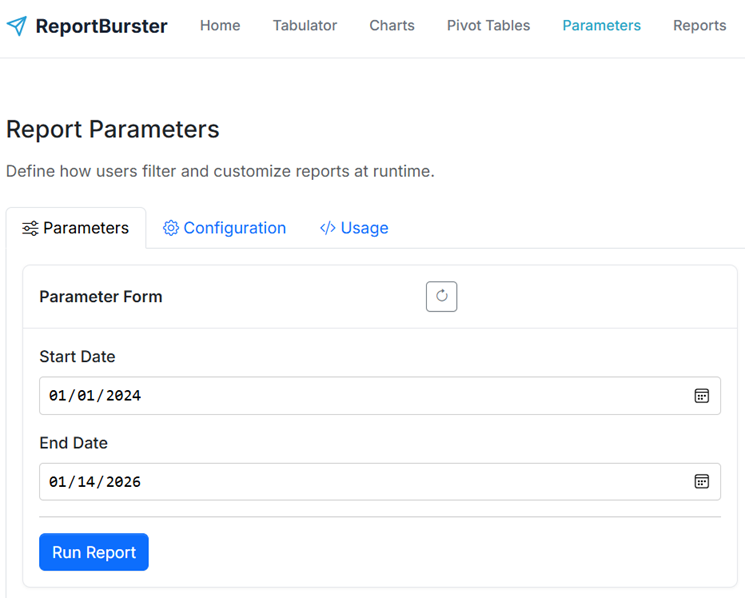
The <rb-parameters> component renders a form with input controls for report parameters. It supports various input types including dates, dropdowns, text inputs, numbers, and checkboxes.
FlowKraft Apps: The FlowKraft Frontend App has this component pre-configured. Just paste your embed code from the Usage tab—no script setup required. See FlowKraft Frontend App for details.
Basic Usage
<rb-parameters
  report-code="sales-report"
  api-base-url="http://localhost:9090/api/jobman/reporting">
</rb-parameters>Attributes
| Attribute | Required | Description |
|---|---|---|
report-code | Yes | ID of the report |
api-base-url | Yes | Base URL for API calls |
DSL Configuration
Parameters are defined in ReportBurster using a Groovy DSL.
Basic Structure
reportParameters {
    parameter(id: 'startDate', type: 'LocalDate') {
        constraints(required: true)
        ui(label: 'Start Date')
    }
}Parameter Properties
| Property | Description | Example Values |
|---|---|---|
id | Unique identifier | 'startDate', 'region' |
type | Data type | 'LocalDate', 'String', 'Integer' |
Supported Types
| Type | Input Control |
|---|---|
LocalDate | Date picker |
LocalDateTime | Date/time picker |
String | Text input or dropdown |
Integer | Number input |
BigDecimal | Decimal input |
Boolean | Checkbox |
Constraints
parameter(id: 'startDate', type: 'LocalDate') {
    constraints(
        required: true,
        min: '2020-01-01'
    )
}| Constraint | Description |
|---|---|
required | Field is mandatory |
min | Minimum value/date |
max | Maximum value/date |
Cross-Field References
Use another parameter's value as a constraint:
reportParameters {
    parameter(id: 'startDate', type: 'LocalDate') {
        constraints(required: true)
        ui(label: 'Start Date')
    }
    parameter(id: 'endDate', type: 'LocalDate') {
        constraints(required: true, min: startDate)
        ui(label: 'End Date')
    }
}UI Hints
parameter(id: 'region', type: 'String') {
    ui(
        label: 'Region',
        control: 'select',
        options: ['North', 'South', 'East', 'West']
    )
}| UI Hint | Description |
|---|---|
label | Display label |
control | Input type ('select', 'input') |
options | Dropdown options |
Examples
Date Range Filter
reportParameters {
    parameter(id: 'startDate', type: 'LocalDate') {
        constraints(required: true)
        ui(label: 'Start Date')
    }
    parameter(id: 'endDate', type: 'LocalDate') {
        constraints(required: true, min: startDate)
        ui(label: 'End Date')
    }
}Region Dropdown
reportParameters {
    parameter(id: 'region', type: 'String') {
        ui(
            label: 'Region',
            control: 'select',
            options: ['All Regions', 'North', 'South', 'East', 'West']
        )
    }
}Combined Filters
reportParameters {
    parameter(id: 'year', type: 'Integer') {
        constraints(required: true, min: 2020, max: 2030)
        ui(label: 'Year')
    }
    parameter(id: 'category', type: 'String') {
        ui(
            label: 'Category',
            control: 'select',
            options: ['Electronics', 'Clothing', 'Food', 'Other']
        )
    }
    parameter(id: 'includeInactive', type: 'Boolean') {
        ui(label: 'Include Inactive')
    }
}