ReportBurster vs Power BI — Two Different Takes on Business Intelligence
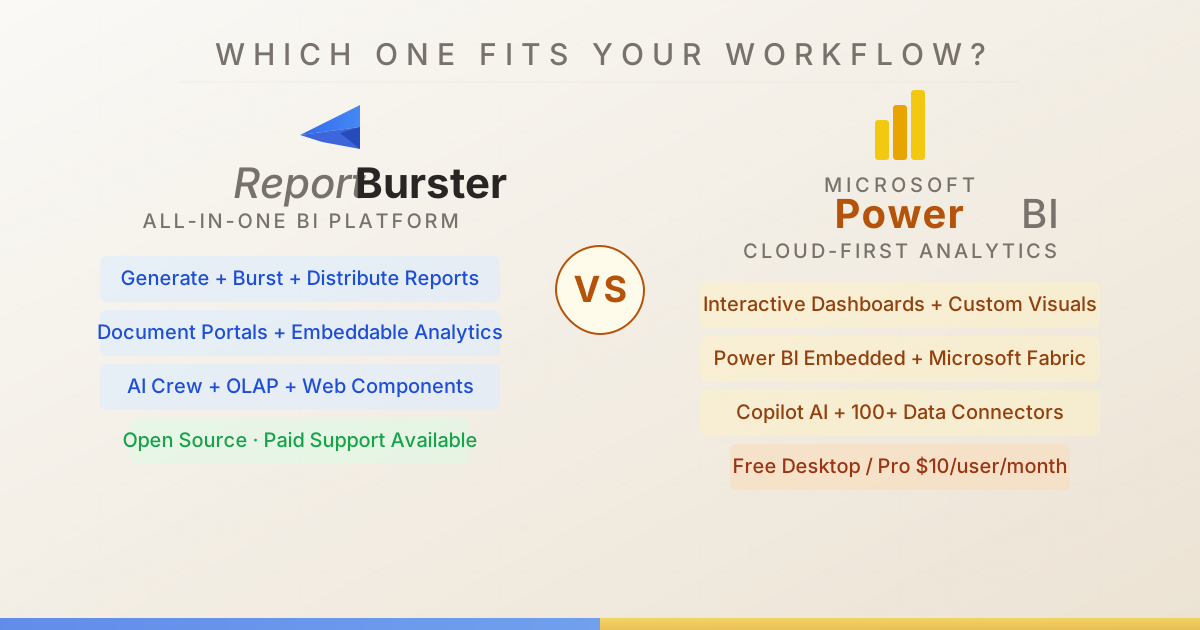
Two Tools, Different Jobs
ReportBurster is a self-hosted, all-in-one BI platform built around the document lifecycle: generate formatted documents, split them per recipient, deliver them automatically, and let end-users access their own documents through a secure portal — with embeddable analytics, dashboards, and AI assistance built in.
Power BI is Microsoft's cloud-first analytics platform — excellent at interactive dashboards, data modeling with DAX, and integration across the Microsoft 365 ecosystem. It's the most widely adopted BI tool in the world for good reason.
The Numbers
| Capability | ReportBurster | Microsoft Power BI |
|---|---|---|
| Data Exploration | ||
| SQL Database Connectivity | ★★★★★ Broad JDBC connectivity | ★★★★★ |
| NoSQL Databases | ★★☆☆☆ Redis for now, more will come (if community asks) | ★★★☆☆ |
| CSV / Excel Files | ★★★★★ | ★★★★★ |
| Natural Language Queries | ★★★★☆ Built-in Chat2DB for conversational data exploration | ★★★★☆ Q&A feature |
| Database Management & Editing | ★★★★☆ Via CloudBeaver and built-in Chat2DB web app | ★★★☆☆ Power Query for data preparation, but not a DB management tool |
| Report Generation | ||
| PDF Report Generation | ★★★★★ | ★★★☆☆ Export to PDF; paginated reports via Report Builder |
| Excel Report Generation | ★★★★★ | ★★★★☆ Export to Excel, Analyze in Excel |
| HTML / Word Report Generation | ★★★★★ HTML and Word documents | ★★☆☆☆ |
| Template / Report Designer | ★★★★☆ AI-assisted templating | ★★★★☆ Power BI Desktop designer |
| Parameterized Reports | ★★★★★ Full parameter support with variables and templating | ★★★☆☆ Parameters and slicers; paginated reports support full parameters |
| Data Source Variety | ★★★★★ SQL, Excel, CSV, XML data sources | ★★★★★ Power Query, 100+ native connectors |
| AI-Assisted Report Building | ★★★★☆ AI crew (Athena) for report generation using LLMs | ★★★☆☆ Copilot in Power BI |
| Report Distribution & Automation | ||
| PDF Bursting / Splitting | ★★★★★ Industry-leading split and distribute by any key(s), one or two levels | ★☆☆☆☆ No built-in bursting; workarounds via Power Automate |
| Report Archiving | ★★★★★ Flexible archiving with dynamic folder structures and variables | ★☆☆☆☆ No dedicated archiving |
| Email Distribution | ★★★★★ | ★★★☆☆ Subscriptions, Power Automate flows |
| FTP / SFTP Upload | ★★★★★ | ★☆☆☆☆ |
| Cloud Storage (S3/Azure/GCS) | ★★★★☆ | ★★★☆☆ |
| Web Upload | ★★★★★ HTTP/WebDAV and REST APIs (SharePoint, WordPress, Drupal, any CMS) | ★☆☆☆☆ SharePoint integration via Power Automate |
| Scheduling / Automation | ★★★★★ | ★★★★☆ Scheduled refresh, subscriptions |
| Delivery Quality Assurance | ★★★★★ Built-in QA guarantees delivery accuracy | ★☆☆☆☆ |
| Document Portal | ||
| Self-Service Document Portal | ★★★★★ Purpose-built portals for HR payslips, customer invoices, billing with online payments | N/A Dashboard/report sharing platform, not personalized document delivery |
| User Management & Access Control | ★★★★☆ Per-user accounts — each user sees only their own documents | N/A Workspace permissions for analytics sharing, not per-user document isolation |
| Notifications & Alerts | ★★★★☆ Notify users when new documents are available | N/A Data alerts for dashboards, not document notifications |
| Portal Customization / Dev Stacks | ★★★★★ Grails or Next.js 15/React/Tailwind stacks | N/A Apps and workspaces with branding — for analytics, not documents |
| Embeddable Analytics & OLAP | ||
| Interactive Dashboards | ★★★★☆ KPI dashboards for sales, finance, monitoring | ★★★★★ |
| Embeddable Web Components | ★★★★★ Data-driven web components: rb-tabulator, rb-chart, rb-pivot-table | ★★★★★ Power BI Embedded — mature platform for embedding in custom apps |
| Chart Type Variety | ★★★★★ | ★★★★★ Custom visuals marketplace |
| Pivot Tables / OLAP Views | ★★★★☆ | ★★★★☆ |
| Interactive Data Tables | ★★★★★ rb-tabulator with 50+ configuration examples | ★★★★☆ |
| Data Warehouse / OLAP Engine | ★★★★☆ OLTP-to-OLAP sync via CDC — DuckDB (up to 100M rows), ClickHouse (billion-row analytics), dbt | ★★★★★ Analysis Services, DAX, Microsoft Fabric |
| Real-Time / Performance | ★★★★☆ Redis support for caching and real-time streaming | ★★★★☆ Streaming datasets, DirectQuery |
| AI Capabilities | ||
| AI Data Analysis | ★★★★☆ Chat2DB: Chat2SQL, tabular data, diagrams, charts | ★★★★☆ Copilot, Quick Insights |
| LLM Integration (GPT/Claude/Gemini) | ★★★★★ Claude, GPT, Gemini or any other AI vendor | ★★★☆☆ Copilot (Microsoft 365) |
| AI Domain Experts / Agents | ★★★★★ Athena (data), Hephaestus (automation), Hermes (portals), Apollo (web) | — |
| Deployment & Hosting | ||
| Self-Hosted / On-Premise | ★★★★★ | ★★★☆☆ Power BI Report Server (limited feature set) |
| Cloud / SaaS | — | ★★★★★ Power BI Service |
| Docker / Container Support | ★★★★☆ | ★☆☆☆☆ |
| OS Support | ✅ Windows ✅ Linux ✅ macOS | ✅ Windows (desktop) ✅ Web (service) |
| Integration & APIs | ||
| REST API | ★★★★☆ | ★★★★★ Comprehensive REST API |
| CLI / Scripting | ★★★★★ | ★★★☆☆ PowerShell cmdlets |
| Extensibility / Plugins | ★★★★★ Groovy/Java scripting and 'Works Well With' integrated apps (CloudBeaver, Rundeck, DocuSeal, etc.) | ★★★★☆ Custom visuals, Power Automate |
| Documentation & Community | ||
| Documentation Quality | ★★★★☆ Comprehensive docs site with interactive examples | ★★★★★ Microsoft Learn, extensive guides, video tutorials |
| Community Size | ★★☆☆☆ New project — growing open-source community (smaller than legacy tools) | ★★★★★ Largest BI community globally, Microsoft ecosystem, huge consultant network |
| Pricing & Licensing | ||
| Free Tier Available | ★★★★★ Fully functional open-source edition | ★★★★☆ Power BI Desktop free, limited sharing |
| Open Source | ★★★★★ GitHub — open source | — |
| Pricing Model | Free open source, 🔶 fully functional, no limitations 🔶 — just no professional support) Or, if you need ✅ professional support ✅ License $595–$2,595 (1–10 users) Maintenance $199–$699/yr (1–10 users) | Free desktop + per-user Pro ($14/mo) / Premium subscription |
Where ReportBurster Has the Edge
Document Generation That Actually Produces Documents
ReportBurster was designed for exactly this: template-driven document generation across PDF, Excel, HTML, and Word — paginated PDF invoices, formatted Excel workbooks per sales region, Word documents with specific layout requirements. Power BI is a dashboard tool. When you need any of these, Power BI either can't do it or requires the separate "paginated reports" feature through Report Builder (a different, older tool).
Report Bursting — Where Power BI Falls Short
Take one master report, split it by department, customer, or any key, and deliver each piece automatically via email, FTP/SFTP, cloud storage, or a web portal — with built-in quality assurance. Power BI has no built-in bursting. The workaround — chaining Power Automate flows — is fragile, limited, and expensive to maintain at scale.
Personalized Document Delivery
ReportBurster's Document Portal lets employees log in to see their payslips, customers to view their invoices, partners to download their statements — each user sees only their own documents, with notification alerts and online payment support. Power BI Service shares dashboards and reports across workspaces; per-user document isolation and payment processing are outside its design.
AI Agents vs. Copilot
ReportBurster's AI crew — Athena, Hephaestus, Hermes, Apollo — are specialized agents that help across the entire platform: building reports, configuring automation, setting up portals, writing integrations. Built-in Chat2DB adds conversational data exploration. Power BI Copilot helps write DAX and summarize visuals — useful within Power BI's own world, but narrower in scope.
Self-Hosted, No Per-Seat Cloud Fees
ReportBurster is open source with full functionality — no feature gating, no artificial limits. Power BI Desktop is free, but sharing anything requires Pro ($14/user/month) or Premium Per User ($20/user/month). A 50-person team on Pro costs $8,400/year — and that's just for viewing dashboards, before Embedded or Fabric costs.
Where Power BI Has the Edge
The Dashboard Experience
Power BI Desktop's data modeling (DAX, relationships, measures) and visualization canvas are genuinely excellent. The custom visuals marketplace adds hundreds of chart types. For building interactive dashboards with drill-through, cross-filtering, and bookmarks — Power BI is one of the best tools available.
Power BI Embedded
If your primary goal is embedding interactive dashboards inside your own SaaS product, Power BI Embedded is a mature, well-documented platform with iframe and JavaScript SDK integration. It's battle-tested at scale across thousands of ISVs.
The Microsoft Ecosystem
Power Query connects to 100+ data sources. Microsoft Fabric unifies data engineering, warehousing, and BI. Integration with Excel, Teams, SharePoint, and Azure is seamless. If your organization already runs on Microsoft 365 and Azure, Power BI slots in with almost zero friction.
Data Modeling & DAX
Power BI's tabular data model with DAX (Data Analysis Expressions) is a powerful analytical engine. Star schemas, calculated measures, time intelligence — it's a genuine strength that goes beyond simple charting. SSAS (Analysis Services) compatibility adds enterprise-grade OLAP.
Community & Documentation
The largest BI community in the world. Microsoft Learn documentation is comprehensive and well-maintained. Power BI Community forums, Guy in a Cube, SQLBI — the ecosystem of learning resources is unmatched.
The Verdict
ReportBurster is the right tool when you want a single platform for report generation, automated bursting and distribution, self-service document portals, embeddable analytics (data tables, charts, pivot tables), interactive dashboards, OLAP, and AI — open source, self-hosted, without per-seat subscription costs.
Power BI is the right tool when cloud-first analytics and deep Microsoft ecosystem integration are your top priorities — and per-user subscription costs fit your budget.