ReportBurster vs Tableau — Picking the Right BI Tool for Your Team
The Short Version
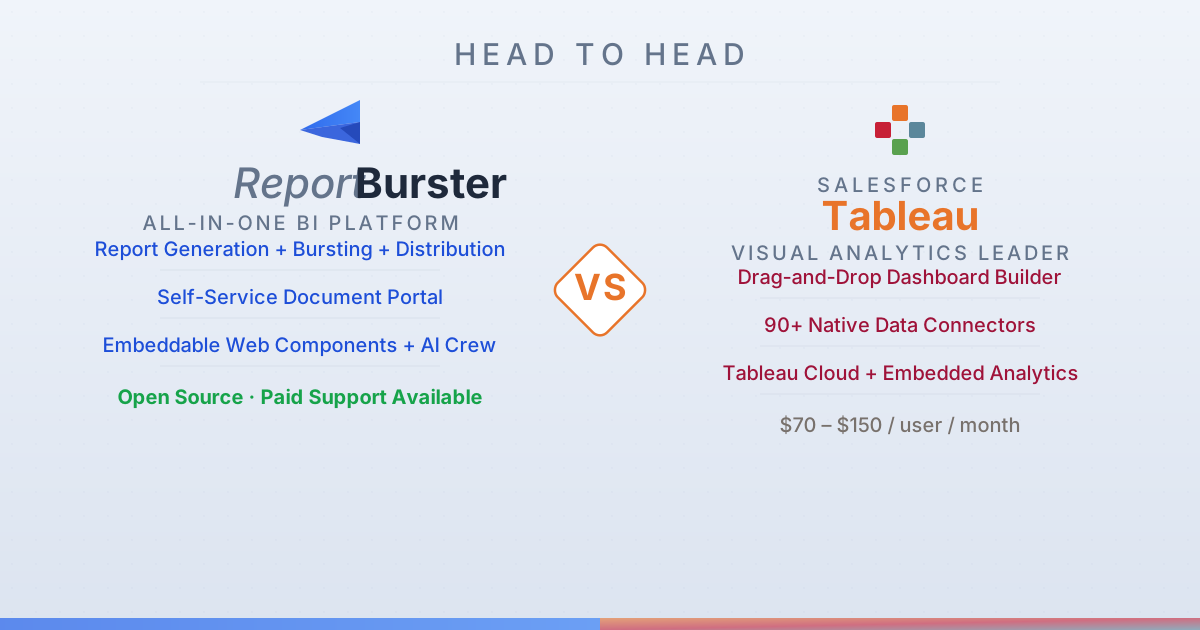
Tableau makes data exploration beautiful. ReportBurster covers the entire BI workflow end-to-end: generate the invoices, payslips, and formatted reports that dashboards can't replace, burst each document to its intended recipient, deliver automatically via email or cloud or FTP, and give every end-user a portal where they find exactly their own files. Embeddable analytics, interactive dashboards, and AI assistance come built in — open source, self-hosted, no per-seat subscription.
Tableau (Salesforce) dominates interactive dashboards. Nobody does drag-and-drop visual exploration better. But dashboards are only one piece of the BI puzzle.
Feature-by-Feature Breakdown
| Capability | ReportBurster | Tableau |
|---|---|---|
| Data Exploration | ||
| SQL Database Connectivity | ★★★★★ Broad JDBC connectivity | ★★★★★ |
| NoSQL Databases | ★★☆☆☆ Redis for now, more will come (if community asks) | ★★★☆☆ |
| CSV / Excel Files | ★★★★★ | ★★★★★ |
| Natural Language Queries | ★★★★☆ Built-in Chat2DB for conversational data exploration | ★★★★☆ Ask Data feature |
| Database Management & Editing | ★★★★☆ Via CloudBeaver and built-in Chat2DB web app | ★★☆☆☆ Tableau Prep for data preparation, but no direct DB management |
| Report Generation | ||
| PDF Report Generation | ★★★★★ | ★★★☆☆ Export to PDF — not a report generation tool |
| Excel Report Generation | ★★★★★ | ★★★☆☆ Export to Excel — not a report generation tool |
| HTML / Word Report Generation | ★★★★★ HTML and Word documents | ★★☆☆☆ |
| Template / Report Designer | ★★★★☆ AI-assisted templating | ★★★☆☆ Dashboard designer, not a paginated report designer |
| Parameterized Reports | ★★★★★ Full parameter support with variables and templating | ★★★☆☆ Dashboard parameters and filters |
| Data Source Variety | ★★★★★ SQL, Excel, CSV, XML data sources | ★★★★★ Web data connectors, 90+ native connectors |
| AI-Assisted Report Building | ★★★★☆ AI crew (Athena) for report generation using LLMs | ★★☆☆☆ |
| Report Distribution & Automation | ||
| PDF Bursting / Splitting | ★★★★★ Industry-leading split and distribute by any key(s), one or two levels | — |
| Report Archiving | ★★★★★ Flexible archiving with dynamic folder structures and variables | ★☆☆☆☆ No dedicated archiving |
| Email Distribution | ★★★★★ | ★★★☆☆ Subscriptions via Tableau Server |
| FTP / SFTP Upload | ★★★★★ | — |
| Cloud Storage (S3/Azure/GCS) | ★★★★☆ | ★★☆☆☆ |
| Web Upload | ★★★★★ HTTP/WebDAV and REST APIs (SharePoint, WordPress, Drupal, any CMS) | ★☆☆☆☆ |
| Scheduling / Automation | ★★★★★ | ★★★★☆ |
| Delivery Quality Assurance | ★★★★★ Built-in QA guarantees delivery accuracy | — |
| Document Portal | ||
| Self-Service Document Portal | ★★★★★ Purpose-built portals for HR payslips, customer invoices, billing with online payments | N/A Dashboard sharing platform, not a personalized document portal |
| User Management & Access Control | ★★★★☆ Per-user accounts — each user sees only their own documents | N/A Dashboard permissions, not per-user document access |
| Notifications & Alerts | ★★★★☆ Notify users when new documents are available | N/A Tableau Pulse is dashboard alerts, not document notifications |
| Portal Customization / Dev Stacks | ★★★★★ Grails or Next.js 15/React/Tailwind stacks | — |
| Embeddable Analytics & OLAP | ||
| Interactive Dashboards | ★★★★☆ KPI dashboards for sales, finance, monitoring | ★★★★★ Industry-leading interactive dashboard experience |
| Embeddable Web Components | ★★★★★ Data-driven web components: rb-tabulator, rb-chart, rb-pivot-table | ★★★★☆ Tableau Embedded Analytics — embed full dashboards |
| Chart Type Variety | ★★★★★ | ★★★★★ |
| Pivot Tables / OLAP Views | ★★★★☆ | ★★★☆☆ |
| Interactive Data Tables | ★★★★★ rb-tabulator with 50+ configuration examples | ★★★☆☆ |
| Data Warehouse / OLAP Engine | ★★★★☆ OLTP-to-OLAP sync via CDC — DuckDB (up to 100M rows), ClickHouse (billion-row analytics), dbt | ★★★☆☆ Hyper engine for data extraction |
| Real-Time / Performance | ★★★★☆ Redis support for caching and real-time streaming | ★★★☆☆ Live connections, data extracts |
| AI Capabilities | ||
| AI Data Analysis | ★★★★☆ Chat2DB: Chat2SQL, tabular data, diagrams, charts | ★★★☆☆ Tableau Pulse, Explain Data |
| LLM Integration (GPT/Claude/Gemini) | ★★★★★ Claude, GPT, Gemini or any other AI vendor | ★★☆☆☆ |
| AI Domain Experts / Agents | ★★★★★ Athena (data), Hephaestus (automation), Hermes (portals), Apollo (web) | — |
| Deployment & Hosting | ||
| Self-Hosted / On-Premise | ★★★★★ | ★★★★☆ Tableau Server |
| Cloud / SaaS | — | ★★★★★ Tableau Cloud |
| Docker / Container Support | ★★★★☆ | ★★★☆☆ |
| OS Support | ✅ Windows ✅ Linux ✅ macOS | ✅ Windows ✅ Linux (server) ✅ macOS (desktop) |
| Integration & APIs | ||
| REST API | ★★★★☆ | ★★★★☆ |
| CLI / Scripting | ★★★★★ | ★★★☆☆ tabcmd CLI |
| Extensibility / Plugins | ★★★★★ Groovy/Java scripting and 'Works Well With' integrated apps (CloudBeaver, Rundeck, DocuSeal, etc.) | ★★★★☆ Extensions API, Tableau Prep |
| Documentation & Community | ||
| Documentation Quality | ★★★★☆ Comprehensive docs site with interactive examples | ★★★★★ World-class documentation, Tableau Help, knowledge base |
| Community Size | ★★☆☆☆ New project — growing open-source community (smaller than legacy tools) | ★★★★★ Massive community, Tableau Conference, thousands of user groups, huge consultant ecosystem |
| Pricing & Licensing | ||
| Free Tier Available | ★★★★★ Fully functional open-source edition | ★★☆☆☆ Tableau Public (public data only) |
| Open Source | ★★★★★ GitHub — open source | — |
| Pricing Model | Free open source, 🔶 fully functional, no limitations 🔶 — just no professional support) Or, if you need ✅ professional support ✅ License $595–$2,595 (1–10 users) Maintenance $199–$699/yr (1–10 users) | Per-user subscription (~$42-$115/user/month depending on role) |
What ReportBurster Brings to the Table
ReportBurster covers the entire BI workflow under one roof: from connecting to your data, through generating and distributing reports, to serving documents in self-service portals and embedding analytics — data tables, charts, pivot tables, and interactive dashboards — into your own applications. Tableau focuses on one thing — dashboards.
Actual Document Generation
Need a formatted PDF invoice? A parameterized Excel report for each sales region? An HTML summary emailed to 500 managers every Monday morning? That's ReportBurster's bread and butter — template-driven document generation across PDF, Excel, HTML, and Word. Tableau exports dashboard screenshots; it doesn't produce paginated, formatted business documents.
Automated Document Routing & Delivery at Scale
ReportBurster's headline feature: take one master report, burst it into individual documents by any key (department, customer, region), and deliver each piece via email, FTP/SFTP, cloud storage, or a self-service portal — automatically, on schedule, with built-in quality assurance. Tableau has dashboard subscriptions that can email views on a schedule, but no native bursting — splitting a document per recipient with routing and QA requires custom work.
A Portal Where People Find Their Own Documents
The Document Portal gives each user a secure login to access only their documents — payslips for employees, invoices for customers, statements for partners — with notifications and online payment support. Tableau shares dashboards; it doesn't deliver personalized documents.
AI Agents That Know Your Stack
ReportBurster's AI crew — Athena for data and reporting, Hephaestus for automation, Hermes for portals, Apollo for web — are specialized agents trained on the platform. Built-in Chat2DB adds conversational data exploration with natural language SQL generation. They help build reports, troubleshoot configurations, and write integrations. Tableau offers Pulse and Explain Data for dashboard-level insights, but nothing that assists across the full workflow.
The Price Tag
ReportBurster is open source with full functionality — no feature gating, no artificial limits. Tableau charges ~$42–$115 per user per month depending on role (Explorer to Creator) — ten people will run you $5,000–$14,000 a year, and that's before you factor in Tableau Server infrastructure or embedded analytics fees.
What Tableau Does Better
Visual Exploration — The Gold Standard
There's a reason Tableau became synonymous with data visualization. The drag-and-drop canvas, smart defaults, and instant visual feedback make exploratory analysis genuinely enjoyable. For ad-hoc questions like "show me sales by region over time, colored by product line" — Tableau is unmatched.
Fully Managed Cloud
Tableau Cloud means zero infrastructure. Automatic updates, built-in collaboration, shared workspaces — all managed by Salesforce. ReportBurster runs on your servers, which means full control but also full responsibility for uptime and updates.
The Biggest BI Community in the World
Annual Tableau Conference, thousands of local user groups, a deep consultant ecosystem, and a decade of Stack Overflow answers. When you hit a wall, someone has already solved it. That ecosystem advantage is real and hard to replicate.
Bottom Line
Choose ReportBurster if you want one platform that handles report generation, automated distribution, document portals, embeddable analytics, dashboards, and AI — open source, without per-seat subscription costs.
Choose Tableau if interactive visual exploration and cloud-hosted dashboards are your primary need, and per-user subscription costs aren't a concern.