Large-Scale Report Generation with MySQL: Seed, Generate, Measure

Virgil
"Can it handle my volume?" — the first question every team asks when evaluating a reporting platform. Fair question. And the honest answer is: it depends on your hardware, your database, your report complexity, your output format.
No vendor benchmark will tell you what happens on your machine with your data. We've been on the receiving end of that frustration ourselves. So we built something better: a way to answer that question yourself, in minutes.
ReportBurster includes a built-in data seeding tool. Pick a database, seed it with 1,000 records or 1,000,000, configure your reports, click Generate, and measure. On your hardware. With your setup. No guesswork.
This walkthrough uses MySQL. The same workflow applies to PostgreSQL, Oracle, SQL Server, MariaDB, IBM Db2, and Supabase.
Starting the MySQL Starter Pack
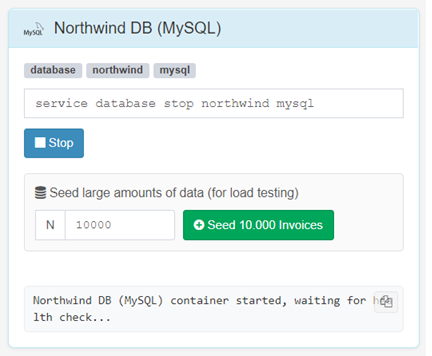
Navigate to Help & Support → Starter Packs / Extra Utils and start the MySQL starter pack (you need Docker installed and running on your computer).
Seeding Your Data Volume
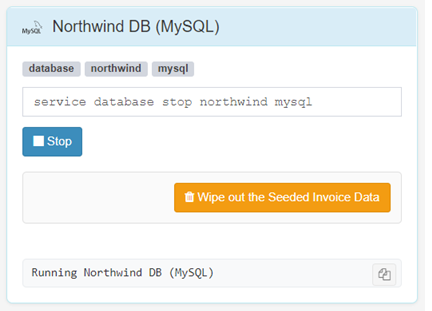
Once the starter pack is running, the seed controls appear below the Start/Stop button.
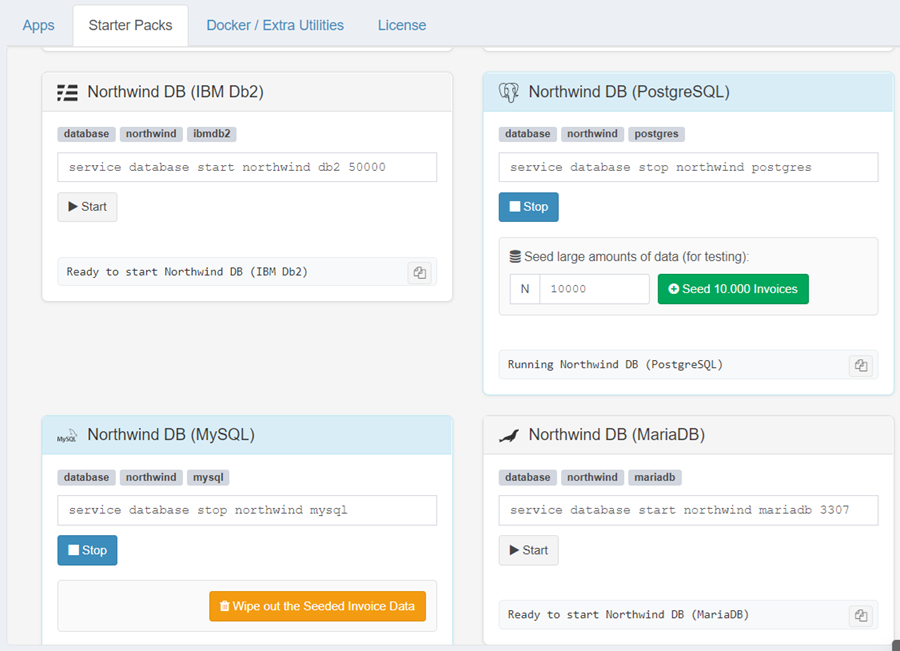
- Enter the number of records you want — 1,000, 10,000, 100,000, or 1,000,000.
- Click Seed.
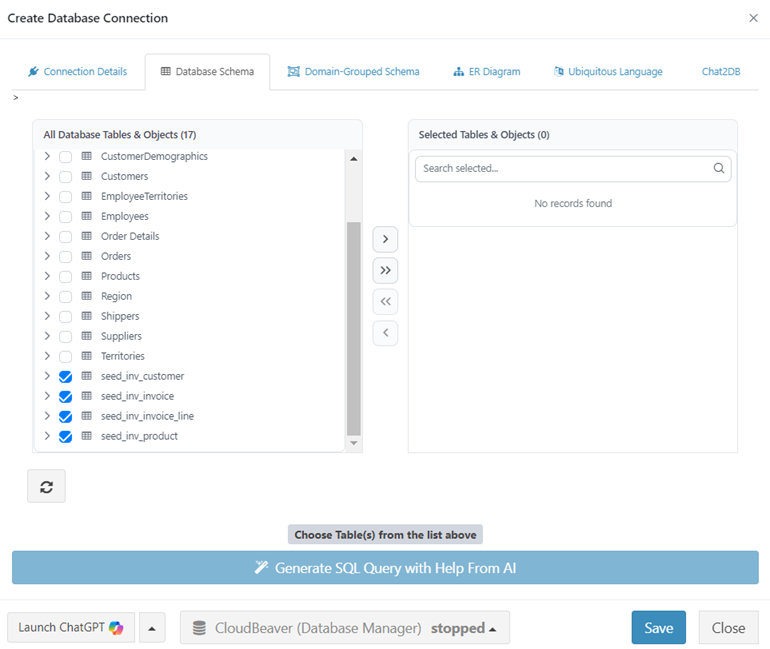
- Wait for completion — realistic data (customers, products, invoice headers, and line items) is generated into dedicated tables.
The seeding tool generates invoices — we'll get into why invoices specifically in the Datasource section below.
Click Wipe out the Seeded Data to clean up and try a different volume. Seed 10x more. Compare. The seeded data sits alongside the original sample data and does not interfere with it.
Configuring the Database Connection
With MySQL running, configure the connection parameters. Go to Configuration → Connections (Email, Databases) and set up your MySQL connection.
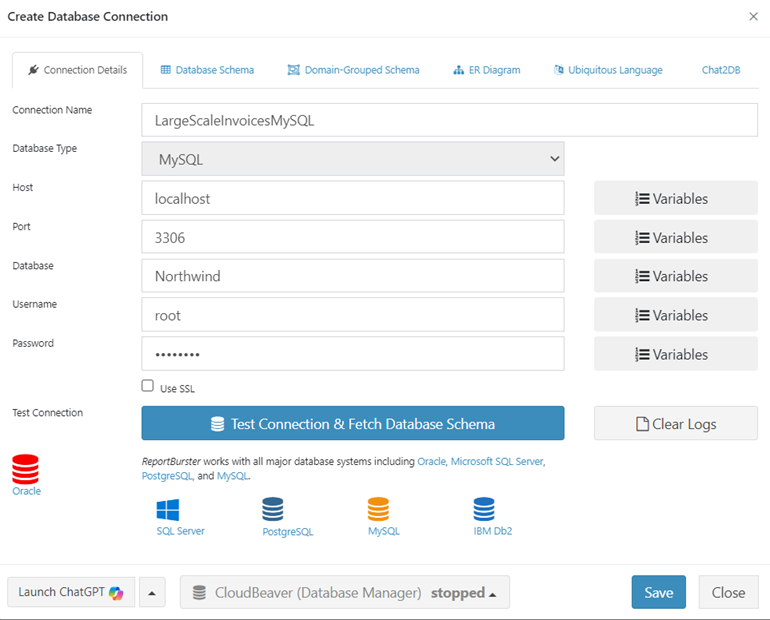
Click Test Database Connection & Fetch Schema. ReportBurster validates your connection and retrieves the complete database schema.
The Datasource
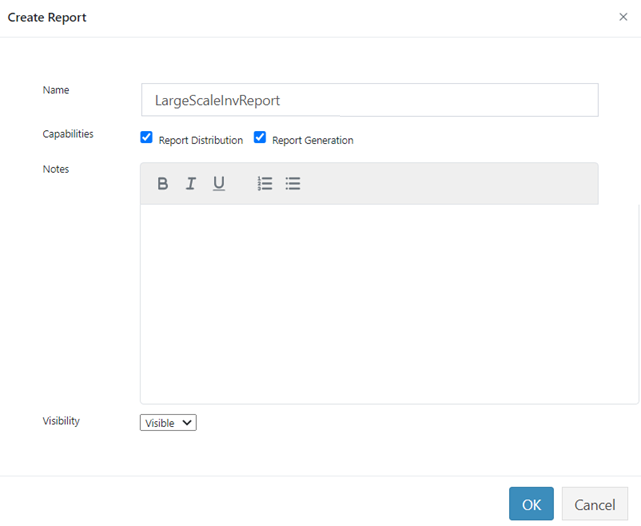
Create a new report and select Script as your Input Type. We use invoices as our test document because they hit the sweet spot — complex enough to be realistic (joins across multiple tables, line items, discounts, tax) but not so overcomplicated that they distract from what actually matters here: testing how your hardware handles large volumes. What you measure with invoices translates directly to payslips, statements, purchase orders, or whatever else you need.
In practice you'd let the built-in AI write this script for you. For now, skip that step — grab the ready-made script below so we can jump straight to the large-volume test.
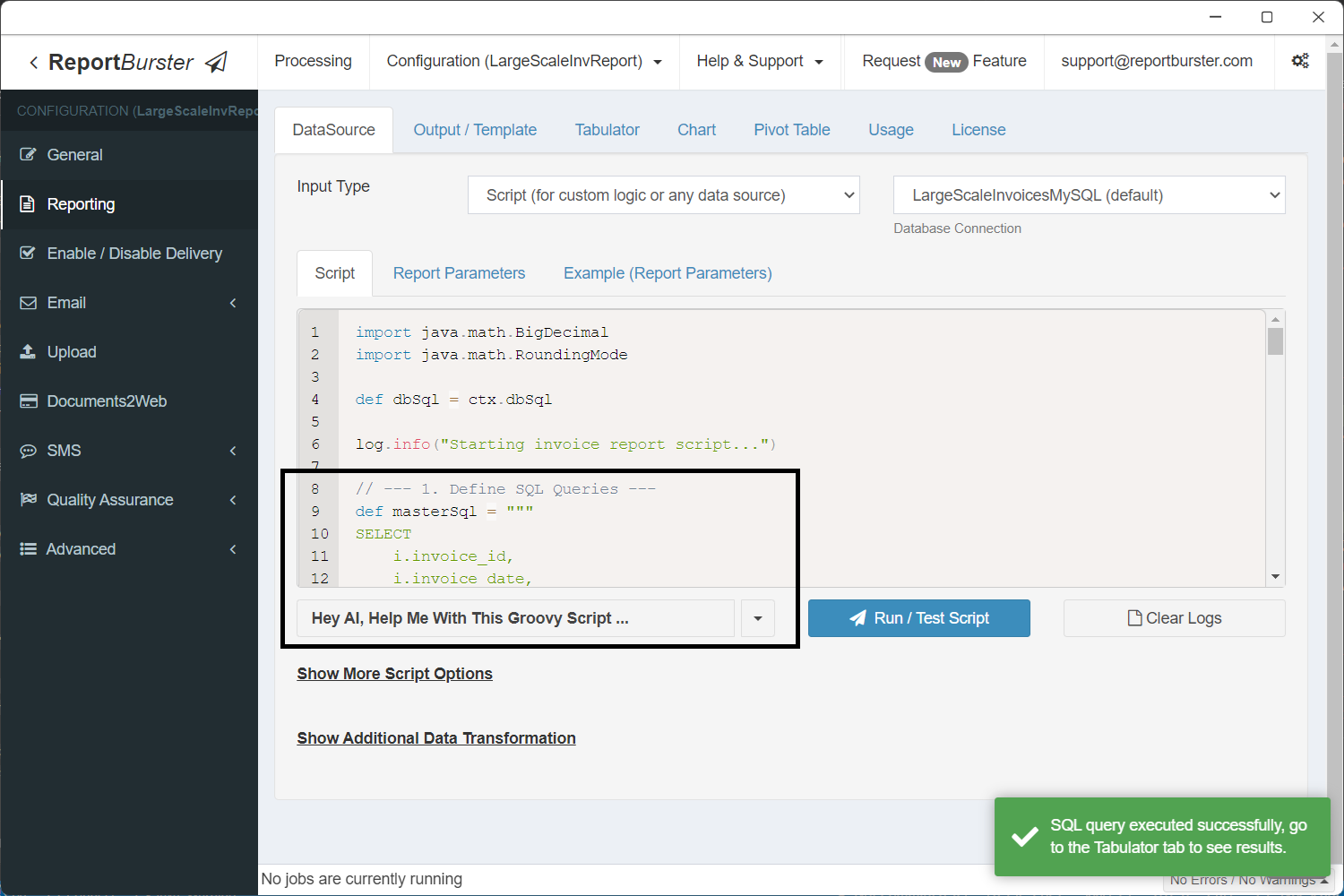
Below is the Groovy script that pulls invoice data from MySQL. It looks long, but remember — in real life the AI writes this for you:
import java.math.BigDecimal
import java.math.RoundingMode

def dbSql = ctx.dbSql

log.info("Starting invoice report script...")

// --- 1. Define SQL Queries ---
def masterSql = """
SELECT
    i.invoice_id,
    i.invoice_date,
    i.due_date,
    i.status,
    i.freight,
    i.notes,
    c.customer_id,
    c.company_name,
    c.contact_name,
    c.address,
    c.city,
    c.country,
    c.email
FROM seed_inv_invoice i
JOIN seed_inv_customer c ON i.customer_id = c.customer_id
ORDER BY i.invoice_id
"""

def detailSql = """
SELECT
    il.line_id,
    il.quantity,
    il.unit_price,
    il.discount,
    p.product_name,
    p.category
FROM seed_inv_invoice_line il
JOIN seed_inv_product p ON il.product_id = p.product_id
WHERE il.invoice_id = ?
ORDER BY il.line_id
"""

// --- 2. Fetch Data and Structure It ---
def allInvoicesData = []

try {
    def masterRows = dbSql.rows(masterSql)
    log.info("Fetched {} invoice rows.", masterRows.size())

    masterRows.each { masterRow ->
        def invoiceData = new LinkedHashMap<String, Object>()
        invoiceData.putAll(masterRow)

        def invoiceId = masterRow.invoice_id
        def detailRows = dbSql.rows(detailSql, invoiceId)
        log.debug("Fetched {} detail rows for invoice_id: {}", detailRows.size(), invoiceId)

        def detailsList = []
        BigDecimal subtotal = BigDecimal.ZERO

        detailRows.each { detailRow ->
            def detailMap = new LinkedHashMap<String, Object>()
            detailMap.putAll(detailRow)

            BigDecimal price = detailRow.unit_price instanceof BigDecimal ? detailRow.unit_price : new BigDecimal(detailRow.unit_price.toString())
            BigDecimal qty = new BigDecimal(detailRow.quantity.toString())
            BigDecimal discount = detailRow.discount instanceof BigDecimal ? detailRow.discount : new BigDecimal((detailRow.discount ?: 0).toString())
            BigDecimal lineTotal = price.multiply(qty).multiply(BigDecimal.ONE.subtract(discount))

            detailMap.put("line_total", lineTotal.setScale(2, RoundingMode.HALF_UP).toString())
            subtotal = subtotal.add(lineTotal)

            detailsList.add(detailMap)
        }

        invoiceData.put("details", detailsList)

        BigDecimal freight = masterRow.freight instanceof BigDecimal ? masterRow.freight : new BigDecimal((masterRow.freight ?: 0).toString())
        BigDecimal taxRate = new BigDecimal("0.08")
        BigDecimal taxableAmount = subtotal.add(freight)
        BigDecimal tax = taxableAmount.multiply(taxRate)
        BigDecimal grandTotal = taxableAmount.add(tax)

        invoiceData.put("Subtotal", subtotal.setScale(2, RoundingMode.HALF_UP).toString())
        invoiceData.put("Tax", tax.setScale(2, RoundingMode.HALF_UP).toString())
        invoiceData.put("GrandTotal", grandTotal.setScale(2, RoundingMode.HALF_UP).toString())

        allInvoicesData.add(invoiceData)
    }

    // --- 3. Set Context Variables ---
    ctx.reportData = allInvoicesData

    if (!allInvoicesData.isEmpty()) {
        ctx.reportColumnNames = new ArrayList<>(allInvoicesData.get(0).keySet().findAll { it != 'details' })
    } else {
        ctx.reportColumnNames = []
    }

    log.info("Finished invoice report script. Prepared data for {} invoices.", ctx.reportData.size())

} catch (Exception e) {
    log.error("Error during script execution: {}", e.getMessage(), e)
    throw e
}Test it using Run / Test Script to verify your data flows through correctly.
The Output Template
We choose Apache FOP because it is damn performant at churning out PDF reports — exactly what you want when generating large volumes. Click Output Template and select PDF (Apache FOP) as your format.
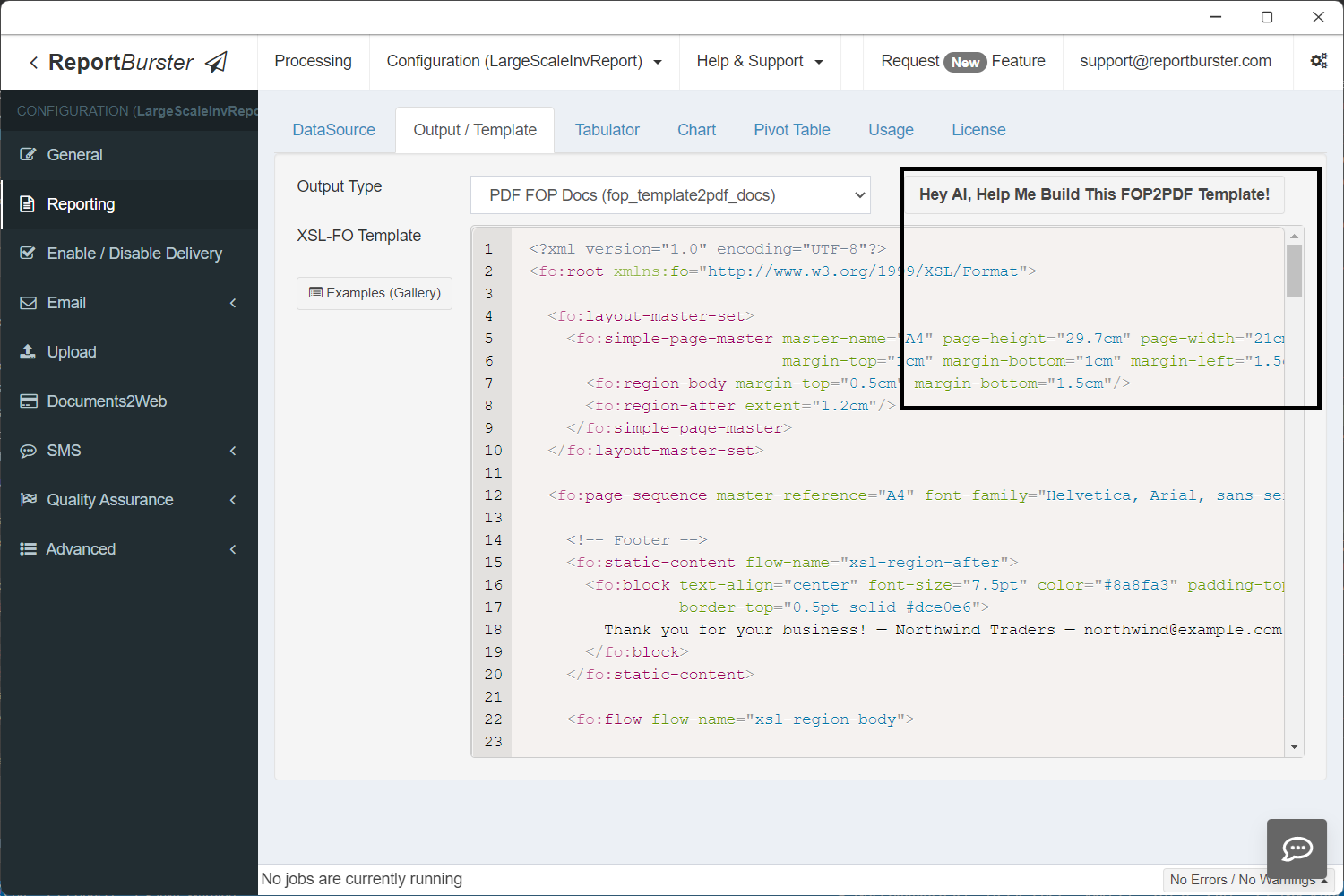
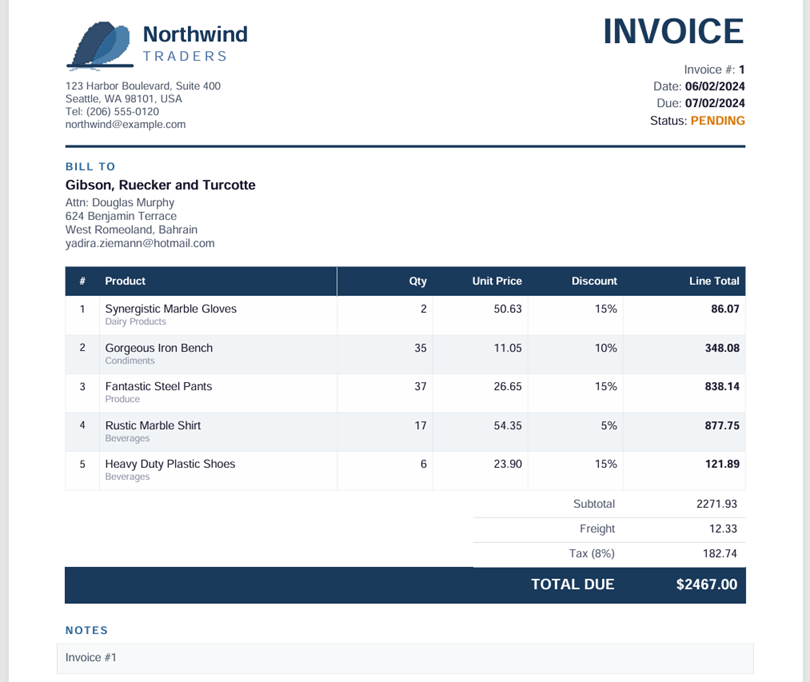
Same idea here — the AI can generate this template from a description of your layout, but we already have one ready. Copy-paste it and keep moving. It produces a clean invoice PDF with line items, totals, and payment details:
<?xml version="1.0" encoding="UTF-8"?>
<fo:root xmlns:fo="http://www.w3.org/1999/XSL/Format">

  <fo:layout-master-set>
    <fo:simple-page-master master-name="A4" page-height="29.7cm" page-width="21cm"
                           margin-top="1cm" margin-bottom="1cm" margin-left="1.5cm" margin-right="1.5cm">
      <fo:region-body margin-top="0.5cm" margin-bottom="1.5cm"/>
      <fo:region-after extent="1.2cm"/>
    </fo:simple-page-master>
  </fo:layout-master-set>

  <fo:page-sequence master-reference="A4" font-family="Helvetica, Arial, sans-serif" font-size="9pt" color="#1a1a2e">

    <!-- Footer -->
    <fo:static-content flow-name="xsl-region-after">
      <fo:block text-align="center" font-size="7.5pt" color="#8a8fa3" padding-top="4pt"
                border-top="0.5pt solid #dce0e6">
        Thank you for your business! — Northwind Traders — [email protected]
      </fo:block>
    </fo:static-content>

    <fo:flow flow-name="xsl-region-body">

      <!-- ========== HEADER: Logo + Company / Invoice Meta ========== -->
      <fo:table table-layout="fixed" width="100%">
        <fo:table-column column-width="50%"/>
        <fo:table-column column-width="50%"/>
        <fo:table-body>
          <fo:table-row>
            <!-- Left: SVG Logo + Company Details -->
            <fo:table-cell>
              <fo:block space-after="4pt">
                <fo:instream-foreign-object>
                  <svg xmlns="http://www.w3.org/2000/svg" width="160" height="42" viewBox="0 0 160 42">
                    <path d="M4 38 C4 38 12 4 28 4 C36 4 40 14 36 22 C32 30 20 36 4 38Z" fill="#1b3a5c" opacity="0.9"/>
                    <path d="M18 38 C18 38 28 10 40 8 C48 6 50 16 46 24 C42 32 30 36 18 38Z" fill="#2e6b9e" opacity="0.85"/>
                    <path d="M2 38 L50 38" stroke="#1b3a5c" stroke-width="2.5" stroke-linecap="round"/>
                    <path d="M2 42 Q14 36 26 42 Q38 48 50 42" stroke="#2e6b9e" stroke-width="1.2" fill="none" opacity="0.5"/>
                    <text x="58" y="20" font-family="Helvetica, Arial, sans-serif" font-size="16" font-weight="bold" fill="#1b3a5c">Northwind</text>
                    <text x="58" y="34" font-family="Helvetica, Arial, sans-serif" font-size="10" fill="#4a6fa5" letter-spacing="2.5">TRADERS</text>
                  </svg>
                </fo:instream-foreign-object>
              </fo:block>
              <fo:block font-size="8pt" color="#4a5568" space-before="4pt">123 Harbor Boulevard, Suite 400</fo:block>
              <fo:block font-size="8pt" color="#4a5568">Seattle, WA 98101, USA</fo:block>
              <fo:block font-size="8pt" color="#4a5568">Tel: (206) 555-0120</fo:block>
              <fo:block font-size="8pt" color="#4a5568">[email protected]</fo:block>
            </fo:table-cell>
            <!-- Right: Invoice title + meta -->
            <fo:table-cell text-align="end" display-align="before">
              <fo:block font-size="26pt" font-weight="bold" color="#1b3a5c" space-after="6pt">INVOICE</fo:block>
              <fo:block font-size="9pt" color="#4a5568" space-after="2pt">
                Invoice #: <fo:inline font-weight="bold" color="#1a1a2e">${invoice_id!""}</fo:inline>
              </fo:block>
              <fo:block font-size="9pt" color="#4a5568" space-after="2pt">
                Date: <fo:inline font-weight="bold" color="#1a1a2e"><#if invoice_date?is_date>${invoice_date?string("MM/dd/yyyy")}<#else>${(invoice_date!"")?xml}</#if></fo:inline>
              </fo:block>
              <fo:block font-size="9pt" color="#4a5568" space-after="2pt">
                Due: <fo:inline font-weight="bold" color="#1a1a2e"><#if due_date?is_date>${due_date?string("MM/dd/yyyy")}<#else>${(due_date!"")?xml}</#if></fo:inline>
              </fo:block>
              <fo:block font-size="9pt" space-after="2pt">
                Status: <fo:inline font-weight="bold" color="<#if (status!"") == "PAID">#16a34a<#else>#d97706</#if>">${(status!"")?xml}</fo:inline>
              </fo:block>
            </fo:table-cell>
          </fo:table-row>
        </fo:table-body>
      </fo:table>

      <!-- Divider -->
      <fo:block space-before="10pt" space-after="10pt" border-bottom="2pt solid #1b3a5c"/>

      <!-- ========== BILL TO ========== -->
      <fo:block font-size="8pt" font-weight="bold" color="#2e6b9e" space-after="3pt" text-transform="uppercase" letter-spacing="1pt">Bill To</fo:block>
      <fo:block font-size="10pt" font-weight="bold" space-after="2pt">${(company_name!"")?xml}</fo:block>
      <fo:block font-size="8.5pt" color="#4a5568"><#if contact_name?has_content>Attn: ${(contact_name!"")?xml}</#if></fo:block>
      <fo:block font-size="8.5pt" color="#4a5568">${(address!"")?xml}</fo:block>
      <fo:block font-size="8.5pt" color="#4a5568">${(city!"")?xml}<#if country?has_content>, ${(country!"")?xml}</#if></fo:block>
      <fo:block font-size="8.5pt" color="#4a5568" space-after="12pt">${(email!"")?xml}</fo:block>

      <!-- ========== LINE ITEMS TABLE ========== -->
      <fo:table table-layout="fixed" width="100%" border-collapse="collapse" space-after="0pt">
        <fo:table-column column-width="5%"/>
        <fo:table-column column-width="35%"/>
        <fo:table-column column-width="14%"/>
        <fo:table-column column-width="14%"/>
        <fo:table-column column-width="14%"/>
        <fo:table-column column-width="18%"/>

        <!-- Header -->
        <fo:table-header>
          <fo:table-row background-color="#1b3a5c" color="#ffffff" font-weight="bold" font-size="8pt">
            <fo:table-cell padding="6pt 4pt" border="0.5pt solid #1b3a5c">
              <fo:block text-align="center">#</fo:block>
            </fo:table-cell>
            <fo:table-cell padding="6pt 4pt" border="0.5pt solid #1b3a5c">
              <fo:block>Product</fo:block>
            </fo:table-cell>
            <fo:table-cell padding="6pt 4pt" border="0.5pt solid #1b3a5c">
              <fo:block text-align="end">Qty</fo:block>
            </fo:table-cell>
            <fo:table-cell padding="6pt 4pt" border="0.5pt solid #1b3a5c">
              <fo:block text-align="end">Unit Price</fo:block>
            </fo:table-cell>
            <fo:table-cell padding="6pt 4pt" border="0.5pt solid #1b3a5c">
              <fo:block text-align="end">Discount</fo:block>
            </fo:table-cell>
            <fo:table-cell padding="6pt 4pt" border="0.5pt solid #1b3a5c">
              <fo:block text-align="end">Line Total</fo:block>
            </fo:table-cell>
          </fo:table-row>
        </fo:table-header>

        <!-- Body -->
        <fo:table-body>
          <#list details as item>
          <fo:table-row background-color="<#if item?index % 2 == 1>#f2f4f7<#else>#ffffff</#if>">
            <fo:table-cell padding="5pt 4pt" border="0.5pt solid #dce0e6">
              <fo:block text-align="center" font-size="8pt">${item?index + 1}</fo:block>
            </fo:table-cell>
            <fo:table-cell padding="5pt 4pt" border="0.5pt solid #dce0e6">
              <fo:block font-size="8.5pt">${(item.product_name!"")?xml}</fo:block>
              <fo:block font-size="7pt" color="#8a8fa3">${(item.category!"")?xml}</fo:block>
            </fo:table-cell>
            <fo:table-cell padding="5pt 4pt" border="0.5pt solid #dce0e6">
              <fo:block text-align="end" font-size="8.5pt">${item.quantity!0}</fo:block>
            </fo:table-cell>
            <fo:table-cell padding="5pt 4pt" border="0.5pt solid #dce0e6">
              <fo:block text-align="end" font-size="8.5pt"><#if item.unit_price?is_number>${item.unit_price?string(",##0.00")}<#else>${(item.unit_price!"")?xml}</#if></fo:block>
            </fo:table-cell>
            <fo:table-cell padding="5pt 4pt" border="0.5pt solid #dce0e6">
              <fo:block text-align="end" font-size="8.5pt"><#if item.discount?is_number><#if (item.discount > 0)>${(item.discount * 100)?string("0")}%<#else>-</#if><#else>${(item.discount!"")?xml}</#if></fo:block>
            </fo:table-cell>
            <fo:table-cell padding="5pt 4pt" border="0.5pt solid #dce0e6">
              <fo:block text-align="end" font-size="8.5pt" font-weight="bold">${(item.line_total!"")?xml}</fo:block>
            </fo:table-cell>
          </fo:table-row>
          </#list>
        </fo:table-body>
      </fo:table>

      <!-- ========== TOTALS ========== -->
      <fo:table table-layout="fixed" width="100%" space-before="2pt">
        <fo:table-column column-width="60%"/>
        <fo:table-column column-width="22%"/>
        <fo:table-column column-width="18%"/>
        <fo:table-body>
          <!-- Subtotal -->
          <fo:table-row>
            <fo:table-cell><fo:block/></fo:table-cell>
            <fo:table-cell padding="4pt 6pt" border-bottom="0.5pt solid #dce0e6">
              <fo:block text-align="end" font-size="8.5pt" color="#4a5568">Subtotal</fo:block>
            </fo:table-cell>
            <fo:table-cell padding="4pt 6pt" border-bottom="0.5pt solid #dce0e6">
              <fo:block text-align="end" font-size="8.5pt">${(Subtotal!"")?xml}</fo:block>
            </fo:table-cell>
          </fo:table-row>
          <!-- Freight -->
          <fo:table-row>
            <fo:table-cell><fo:block/></fo:table-cell>
            <fo:table-cell padding="4pt 6pt" border-bottom="0.5pt solid #dce0e6">
              <fo:block text-align="end" font-size="8.5pt" color="#4a5568">Freight</fo:block>
            </fo:table-cell>
            <fo:table-cell padding="4pt 6pt" border-bottom="0.5pt solid #dce0e6">
              <fo:block text-align="end" font-size="8.5pt"><#if freight?is_number>${freight?string(",##0.00")}<#else>${(freight!"")?xml}</#if></fo:block>
            </fo:table-cell>
          </fo:table-row>
          <!-- Tax -->
          <fo:table-row>
            <fo:table-cell><fo:block/></fo:table-cell>
            <fo:table-cell padding="4pt 6pt" border-bottom="0.5pt solid #dce0e6">
              <fo:block text-align="end" font-size="8.5pt" color="#4a5568">Tax (8%)</fo:block>
            </fo:table-cell>
            <fo:table-cell padding="4pt 6pt" border-bottom="0.5pt solid #dce0e6">
              <fo:block text-align="end" font-size="8.5pt">${(Tax!"")?xml}</fo:block>
            </fo:table-cell>
          </fo:table-row>
          <!-- Grand Total -->
          <fo:table-row background-color="#1b3a5c">
            <fo:table-cell><fo:block/></fo:table-cell>
            <fo:table-cell padding="7pt 6pt">
              <fo:block text-align="end" font-size="11pt" font-weight="bold" color="#ffffff">TOTAL DUE</fo:block>
            </fo:table-cell>
            <fo:table-cell padding="7pt 6pt">
              <fo:block text-align="end" font-size="11pt" font-weight="bold" color="#ffffff">$${(GrandTotal!"")?xml}</fo:block>
            </fo:table-cell>
          </fo:table-row>
        </fo:table-body>
      </fo:table>

      <!-- ========== NOTES ========== -->
      <#if notes?has_content>
      <fo:block space-before="16pt" space-after="4pt" font-size="8pt" font-weight="bold" color="#2e6b9e"
               text-transform="uppercase" letter-spacing="1pt">Notes</fo:block>
      <fo:block font-size="8.5pt" color="#4a5568" padding="6pt" background-color="#f8f9fb"
                border="0.5pt solid #dce0e6">${(notes!"")?xml}</fo:block>
      </#if>

      <!-- ========== PAYMENT INFO ========== -->
      <fo:block space-before="18pt" space-after="4pt" font-size="8pt" font-weight="bold" color="#2e6b9e"
               text-transform="uppercase" letter-spacing="1pt">Payment Information</fo:block>
      <fo:table table-layout="fixed" width="60%">
        <fo:table-column column-width="35%"/>
        <fo:table-column column-width="65%"/>
        <fo:table-body>
          <fo:table-row>
            <fo:table-cell padding="2pt 0pt"><fo:block font-size="8pt" color="#4a5568">Bank:</fo:block></fo:table-cell>
            <fo:table-cell padding="2pt 0pt"><fo:block font-size="8pt">Northwind National Bank</fo:block></fo:table-cell>
          </fo:table-row>
          <fo:table-row>
            <fo:table-cell padding="2pt 0pt"><fo:block font-size="8pt" color="#4a5568">Account:</fo:block></fo:table-cell>
            <fo:table-cell padding="2pt 0pt"><fo:block font-size="8pt">XXXX-XXXX-4820</fo:block></fo:table-cell>
          </fo:table-row>
          <fo:table-row>
            <fo:table-cell padding="2pt 0pt"><fo:block font-size="8pt" color="#4a5568">Routing:</fo:block></fo:table-cell>
            <fo:table-cell padding="2pt 0pt"><fo:block font-size="8pt">021-000-089</fo:block></fo:table-cell>
          </fo:table-row>
        </fo:table-body>
      </fo:table>

    </fo:flow>
  </fo:page-sequence>
</fo:root>Generating Reports at Scale
Everything's in place — database seeded, script tested, template configured. Navigate to Processing → Generate Reports and click Burst.
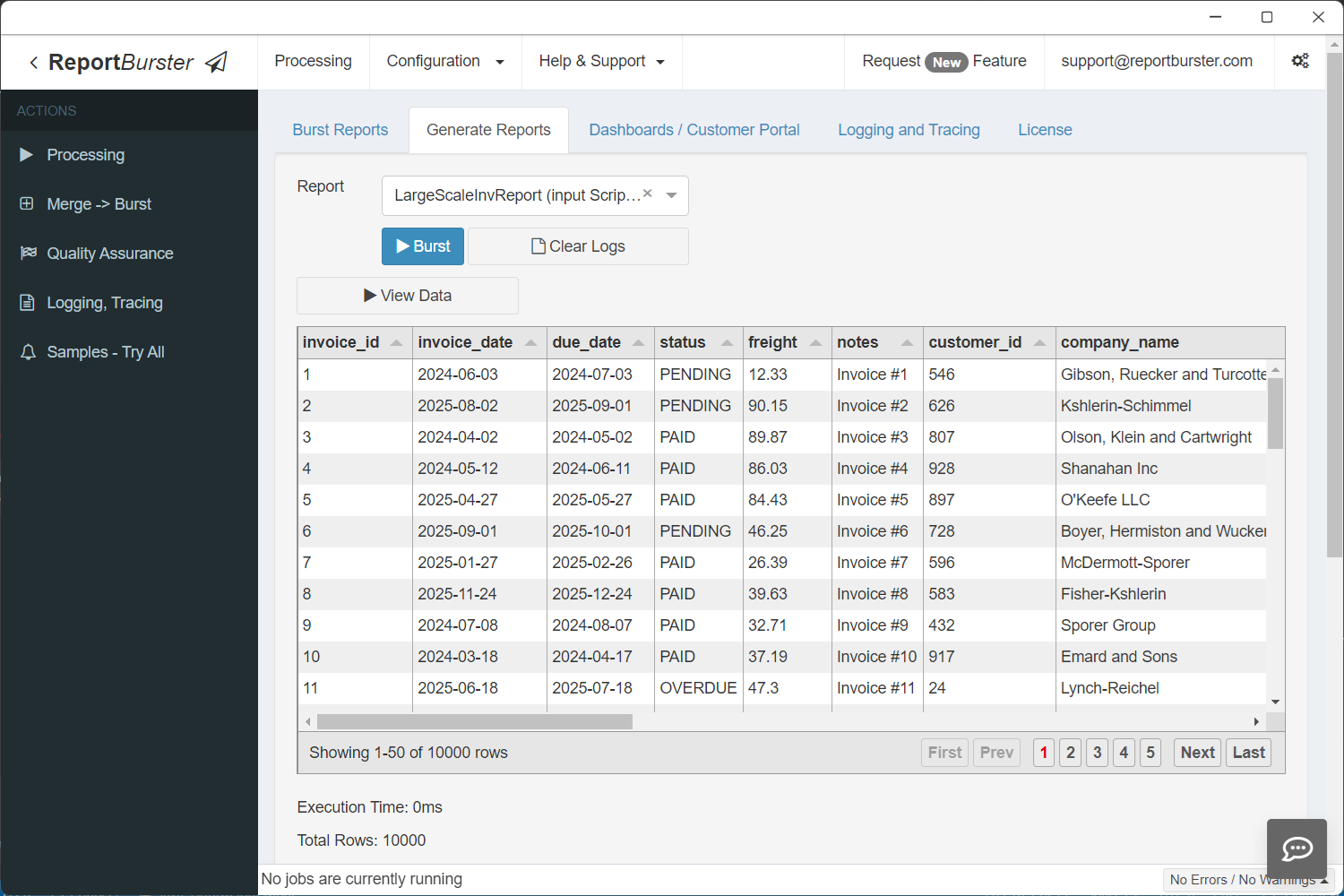
This is the moment of truth — not a number on a marketing page, but a real run on your real machine.
Check the output folder. You will know:
- How long it took — from start to finish.
- How many documents per minute — your actual throughput.
- How your machine handled it — CPU, memory, disk usage.
This is your answer. Not ours — yours.
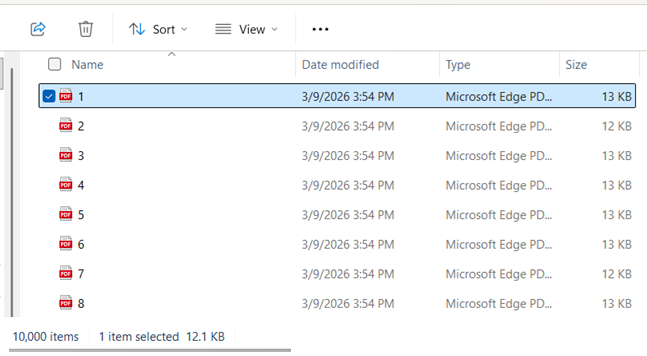
(Hint: for us it took approximately 30 minutes to generate 10,000 invoices on a regular consumer laptop)
Tips for Large Volumes
- Start small. Seed 1,000 records first to verify everything works, then scale up.
- Monitor disk space. Generating a large number of documents takes disk space. Make sure your output drive has room.
- Windows Explorer and large folders. Explorer gets sluggish once a folder has more than ~100,000 files. Don't panic — the generation itself is fine, it's just the file browser that struggles.
- Try different databases. The same data volume can perform differently across database engines. Seed the same amount on multiple vendors and compare.
- Wipe before re-seeding. Always wipe the previous seeded data before seeding again to keep your test clean.
Any Database, Any Scale
We used MySQL here, but the same workflow applies to PostgreSQL, Oracle, SQL Server, MariaDB, IBM Db2, and Supabase. Same seeding tool, same steps.
And invoices are just the test vehicle. Once you know your throughput, swap in whatever your business actually needs — payslips, statements, purchase orders, packing slips.
Download ReportBurster and find out what your hardware can do.
Like what you see but too busy to set it up yourself? We'll do it for you — just tell us what you need.
From simple setup and configuration walkthroughs, to building custom reports, to deploying fully custom document portals and BI dashboards — we handle it all.
Don't want to deal with infrastructure? We host the whole solution. You'll just log in as admin and enjoy fully automated document workflows.